How to Duplicate a Category in Project Management
How to Duplicate a Category in Project Management
Step 1: Open the concerned project
Step 2: Go to Project Management Tab

Step 3: Click on "Duplicate Category Icon"
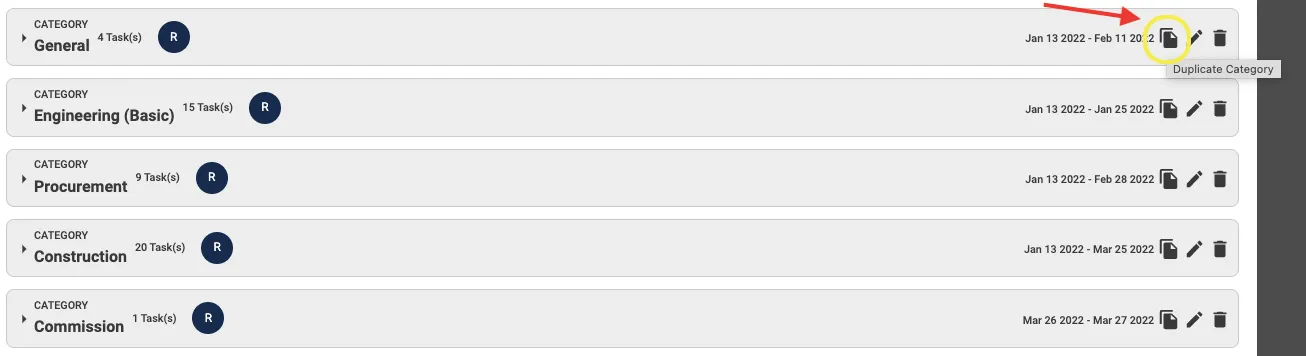
Step 4: Click "Ok"

A duplicate category will be created consisting of all tasks and sub-tasks as in the original category
Related Articles
How To Create Categories in Project Management
How To Create Categories in Project Management Step 1: Open the project and Click on Project Management Step 2: Click on + Create A Category Step 3: Enter the necessary details Step 4: Press + Create Category Please Note: Start by adding the category ...How to Change Order of Categories/Tasks in Project Management
How to Change Order of Categories/Tasks in Project Management Step 1: Open the concerned project Step 2: Go to Project Management Tab Step 3: Click on the "Toggle Button" to allow Drag Step 4: Drag the concerned Category/Task "up or down" to the ...How To Add Tasks In Project Management Categories
How To Add Tasks In Project Management Categories Step 1: Open the Project and Go To Project Management Step 2: Select the Category you want to create a Task in by Clicking on the Drop Down Arrow and Click on + Add A Task Step 3: Enter necessary ...How To Create Dependencies on Project Management Gantt Chart
How To Create Dependencies on Project Management Gantt Chart Step 1: Open Project and Go To Project Management Step 2: Select Gantt Chart Viewing Option Step 3: Open the Category you want to Create a Dependency in Step 4: Press Ctrl (For Windows OS)/ ...How To Add Sub - Tasks In Project Management
How To Add Sub - Tasks In Project Management Step 1: Open the Project and Go To Project Management Step 2: Select the Category where the Task you want to create a Sub-Task for is present Step 3: Click on the Task you want to create a Sub-Task for ...