How To Create Dependencies on Project Management Gantt Chart
How To Create Dependencies on Project Management Gantt Chart
Step 1: Open Project and Go To Project Management

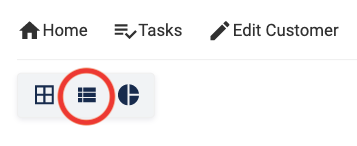
Step 2: Select Gantt Chart Viewing Option
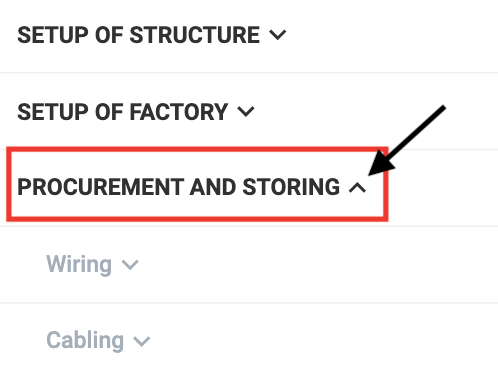
Step 3: Open the Category you want to Create a Dependency in
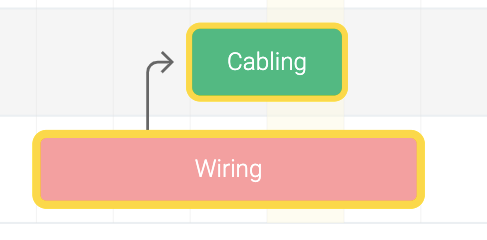
Step 4: Press Ctrl (For Windows OS)/ Command (For Mac/iOS) and Click one by one on the Two Tasks you want to Create Dependency in
Please Note: Backward Dependencies cannot be created

Dependency will be created for the two Selected Tasks as shown below
Related Articles
How To Create Categories in Project Management
How To Create Categories in Project Management Step 1: Open the project and Click on Project Management Step 2: Click on + Create A Category Step 3: Enter the necessary details Step 4: Press + Create Category Please Note: Start by adding the category ...How To Initialise Project Management for A Project
How To Initialise Project Management for A Project Step 1: Open Project and Go To Project Management Step 2: Click on Initialise Project Management For This Project Step 3: Coose from one of the Saved Templates or Create a New One To Create New One, ...How To Add Tasks In Project Management Categories
How To Add Tasks In Project Management Categories Step 1: Open the Project and Go To Project Management Step 2: Select the Category you want to create a Task in by Clicking on the Drop Down Arrow and Click on + Add A Task Step 3: Enter necessary ...How To Add Sub - Tasks In Project Management
How To Add Sub - Tasks In Project Management Step 1: Open the Project and Go To Project Management Step 2: Select the Category where the Task you want to create a Sub-Task for is present Step 3: Click on the Task you want to create a Sub-Task for ...How to Save a Project Management Template
How to Save a Project Management Template Step 1: Open the project with the concerned template Step 2: Go to Project Management Tab Step 3: Click on "3 dots" Select "Save Template" Step 4: Select "Save Template" Step 5: Add "Template Name" and Click ...