How to track a customer datewise
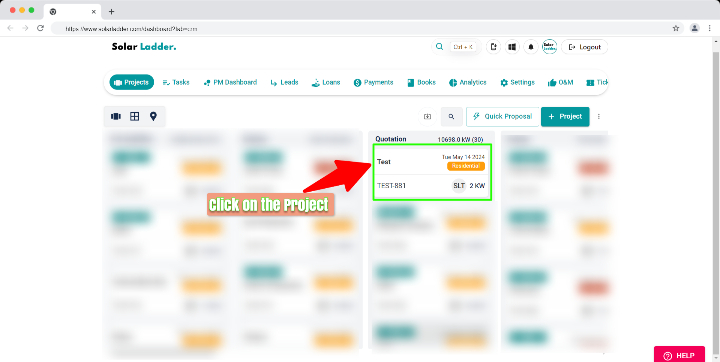
Step 1 : Click on the Project
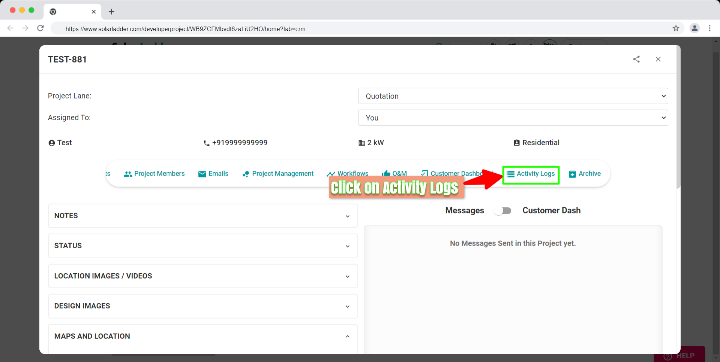
Step 2 : Click on Activity Logs
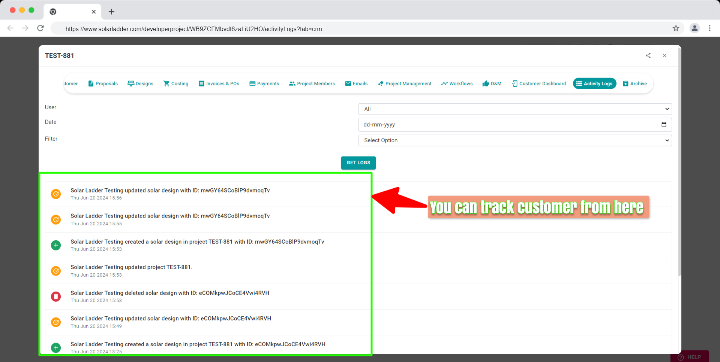
Step 3 : Now you can track your customer datewise
Related Articles
How to update location in project
Step 1 : Click on the project in which you want to update the location Step 2 : Click on Maps and Location Step 3 : Click on Select Location Yourself Step 4 : Click on Auto Detect My Location if you are present at the location OR Search the ...How To Backdate a Project Creation
How To Backdate a Project Creation Step 1: Go to Projects Tab and Open the project you want to backdate Step 2: Go to "Edit Customer" Step 3: Select the New Date Step 4: Click on Update ProjectHow to Share Customer Dashboard Link with Customer
Step 1: Open the concerned project and Go to Customer Dashboard Tab Step 2: Click on "Get Link To Share With Customer" Link gets copied to the clipboard. Share it with the customer via preferred channel of communication.How to Edit Customer Information
How to Edit Customer Information Step 1: Open the concerned project Step 2: Go to Edit Customer Tab and make desired changes Step 3: Click on Update Project at the bottom of the page to Save the changesHow To Initialise Project Management for A Project
How To Initialise Project Management for A Project Step 1: Open Project and Go To Project Management Step 2: Click on Initialise Project Management For This Project Step 3: Coose from one of the Saved Templates or Create a New One To Create New One, ...