How To Backdate a Project Creation
How To Backdate a Project Creation
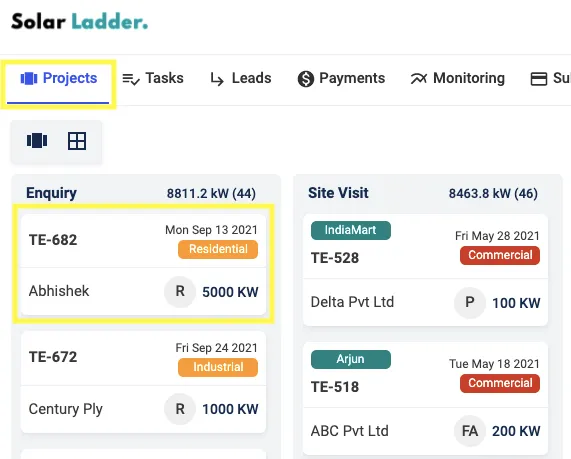
Step 1: Go to Projects Tab and Open the project you want to backdate
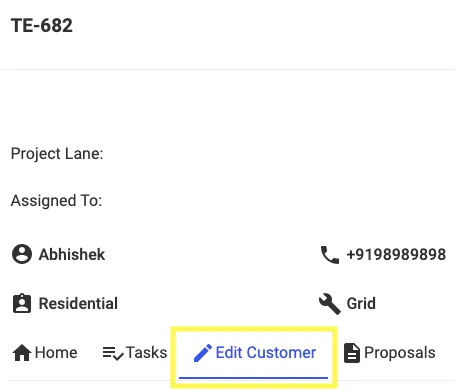
Step 2: Go to "Edit Customer"
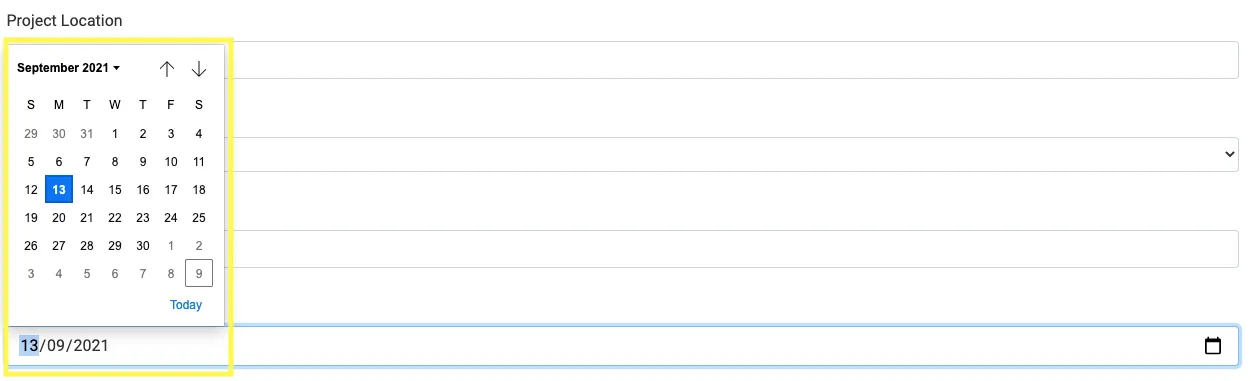
Step 3: Select the New Date
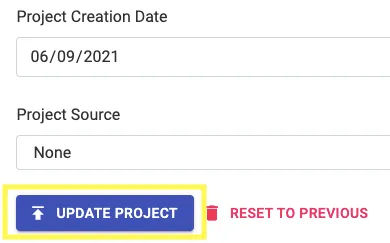
Step 4: Click on Update Project
Related Articles
How To Assign A Project
How to Assign A Project Please Note: The following points are for Partial Users i.e. members who do not have Admin Access 1. Assign Project To Yourself ("You") When creating a project, if you assign the project to yourself, you will be the "Owner" of ...How To Initialise Project Management for A Project
How To Initialise Project Management for A Project Step 1: Open Project and Go To Project Management Step 2: Click on Initialise Project Management For This Project Step 3: Coose from one of the Saved Templates or Create a New One To Create New One, ...How To Create Categories in Project Management
How To Create Categories in Project Management Step 1: Open the project and Click on Project Management Step 2: Click on + Create A Category Step 3: Enter the necessary details Step 4: Press + Create Category Please Note: Start by adding the category ...How to Save a Project Management Template
How to Save a Project Management Template Step 1: Open the project with the concerned template Step 2: Go to Project Management Tab Step 3: Click on "3 dots" Select "Save Template" Step 4: Select "Save Template" Step 5: Add "Template Name" and Click ...How To Delete A Project Management Template
How To Delete A Project Management Template Step 1: Go to Settings and Click on Templates Step 2: Select the "Bin" Icon on the Template you want to Delete Step 3: Click on OK