How to edit Terms & Conditions
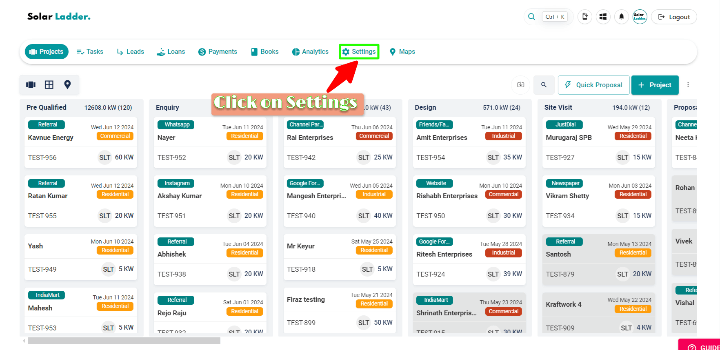
Step 1 : Click on Settings
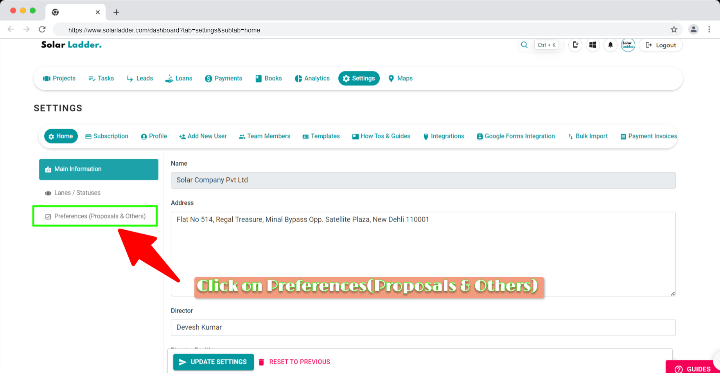
Step 2: Click on Preferences (Proposals & Others)
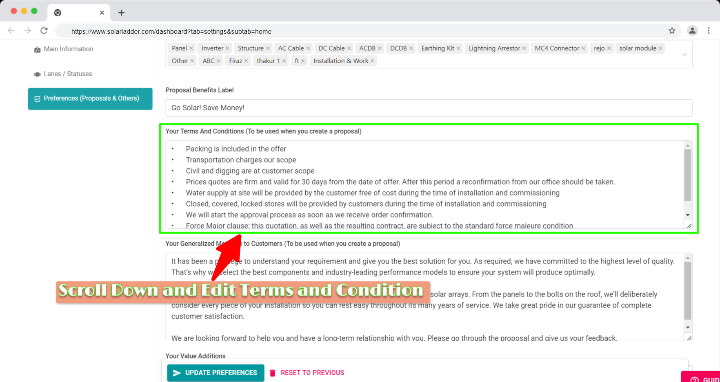
Step 3 : Scroll down and Search for Your Terms and Conditions box and Edit
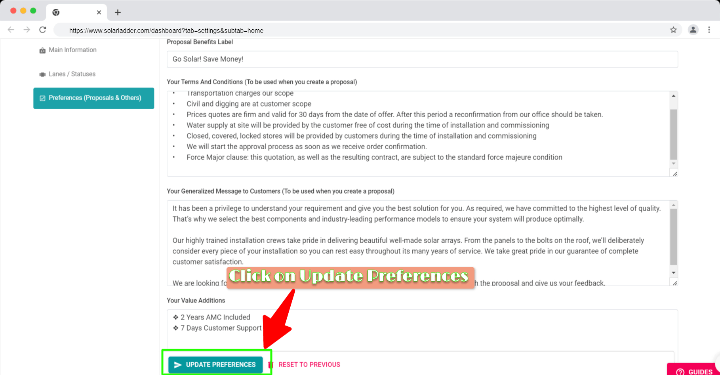
Step 4 : Make sure to click on Update Proposals
Related Articles
How to Update bank details
Step 1: Click on the Settings Step 2: GO to HOME Step 3: GO to Preferences (Proposals & Others) Step 4: Scroll down, Go to "Your Payment Details" and Update the details in the box Step 5: Click on "Update Preferences" to save the data.Solar Ladder - Quick Training Video 1
Get Started with Solar Ladder using this quick training video covering the main modules of Solar Ladder:Solar Ladder - In Depth Training Video
This Training Video covers all features of Solar Ladder in depth.Advanced: How to change your account email?
If you want to change the email of an admin of your organisation: Reach out to your Solar Ladder account manager. If you want to change the email of a regular user of your organisation, follow the following steps: Go to Settings -> Team Members Click ...How To Change Your Account Password
Method 1: When You are not Logged In to your account When logging in, click on "Forgot Password" Enter your account's email and click on "Send Password Reset Email" This will send a password reset link to your email address, which you can use to ...