How To Change Your Account Password
Method 1: When You are not Logged In to your account
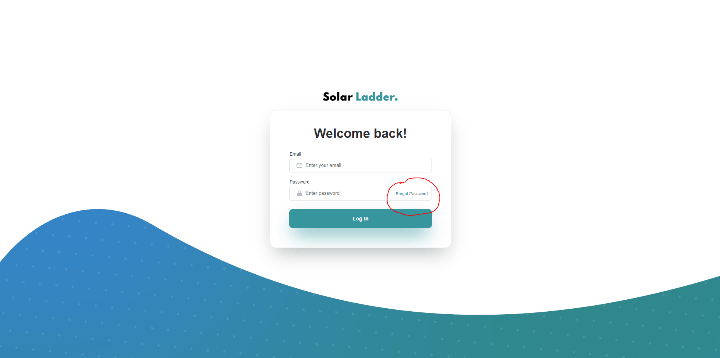
When logging in, click on "Forgot Password"
Enter your account's email and click on "Send Password Reset Email"
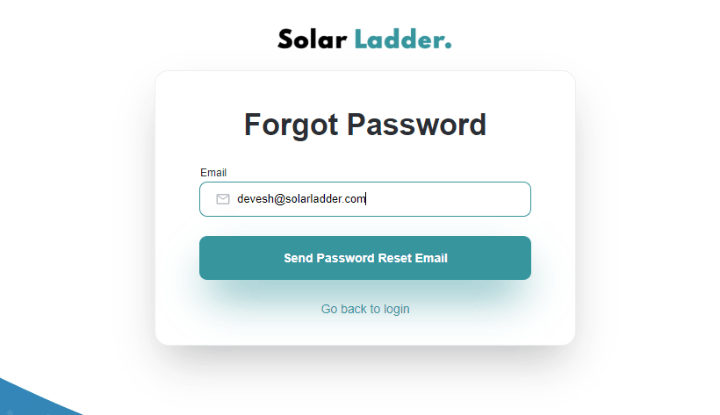
This will send a password reset link to your email address, which you can use to reset your password and login again.
Method 2: When you are already signed in to Solar Ladder
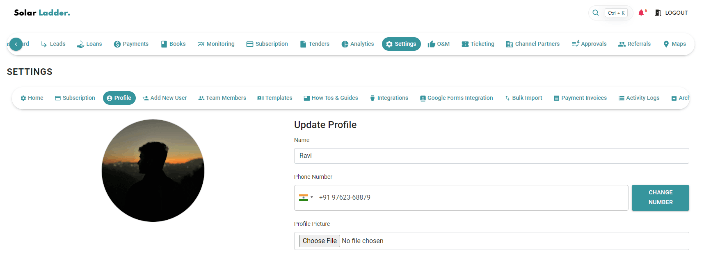
Go to Settings -> Profile
Scroll down and click on the "Change Password" button
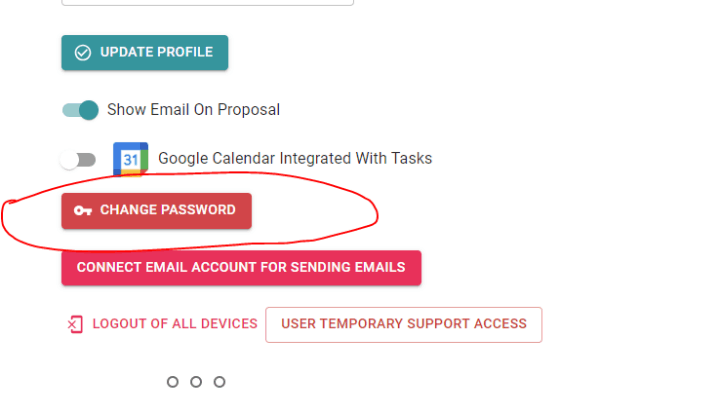
This will send a password reset link to your email address which you can use to reset your password and login again.
Related Articles
Advanced: How to change your account email?
If you want to change the email of an admin of your organisation: Reach out to your Solar Ladder account manager. If you want to change the email of a regular user of your organisation, follow the following steps: Go to Settings -> Team Members Click ...What to do if you forget your Password
What to do if you forget your Password Step 1: Go to www.Solarladder.com and Click on Login (Present on top right corner of screen) Step 2: Click on "Forgot Password?" Step 3: Enter your Email ID and Click on "Send Password Reset Email" Button Step ...How to Change Company Logo
How to Change Company Logo Step 1: Go to Settings Tab and Click on Home Step 2: Go to Company Logo and Drop Image/Click on the box to upload logo Step 3: Click on Update Settings to save the changesHow to Change your Company Address
How to Change your Company Address Step 1: Go to Settings Tab and Click on Home Step 2: Scrool down to Address and Make the necessary changes Step 3: Click on Update Settings to save the changesHow to Verify Your Phone Number
How to Verify Mobile Number Step 1: Got to Settings --> Profile Step 2: Enter Mobile Number and Click Send OTP Step 3: Enter Account Password and Click OK Step 4: Enter OTP and Click Verify