How to Update Invoice Information
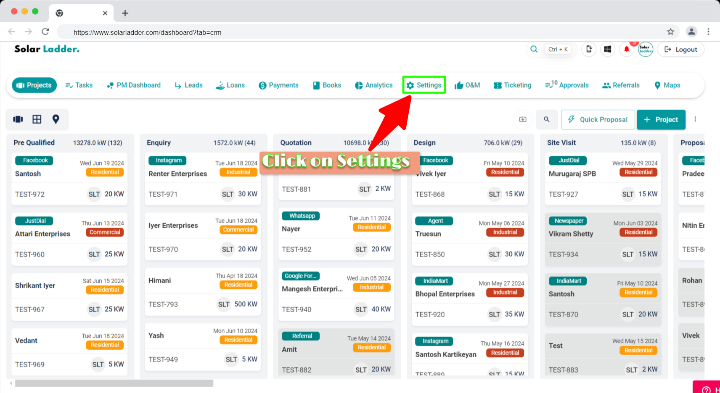
Step 1 : Click on Settings
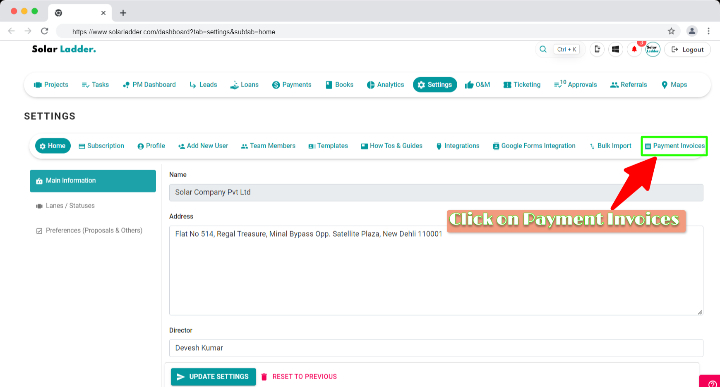
Step 2 : Click on Payment Invoices
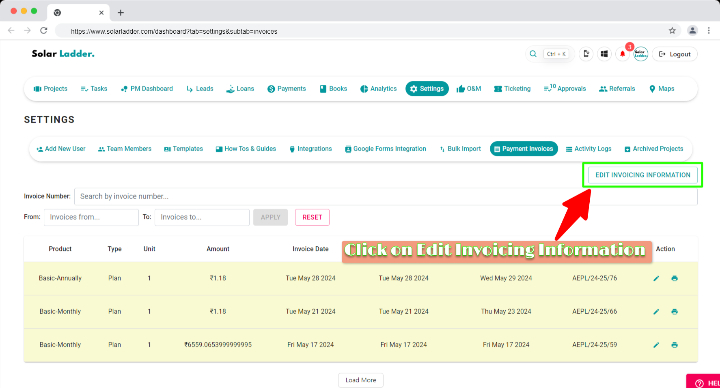
Step 3 : Click on Edit Invoicing Information
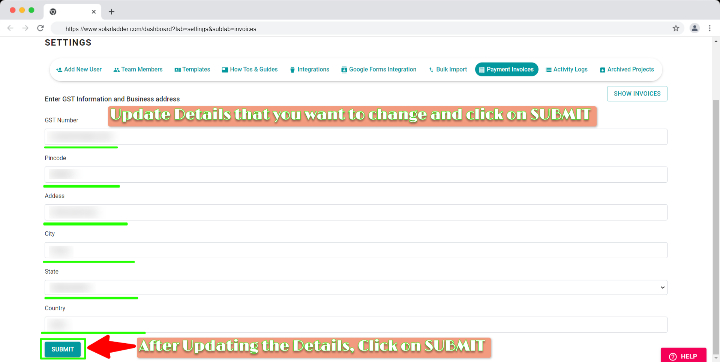
Step 4 : Update the Details that you want to Edit & After Updating please click on SUBMIT
Related Articles
Using Invoices and Purchase Orders on Solar Ladder
The Invoices and POs tab inside a Project comprises Invoices, Delivery Challans and Purchase Orders. You can do the following actions right inside your platform: Creating invoices for your clients Saving those documents to PDF format on your device. ...How to Update bank details
Step 1: Click on the Settings Step 2: GO to HOME Step 3: GO to Preferences (Proposals & Others) Step 4: Scroll down, Go to "Your Payment Details" and Update the details in the box Step 5: Click on "Update Preferences" to save the data.How to Edit Customer Information
How to Edit Customer Information Step 1: Open the concerned project Step 2: Go to Edit Customer Tab and make desired changes Step 3: Click on Update Project at the bottom of the page to Save the changesHow to update contact details from Settings
Step 1: Go to the "Settings" tab. Step 2: Click on "Main Information" Step 3: Scroll down and update "Phone number" Step 4: Click on "Update preferences" to save the data.How To View Previously Added O&M Information
How To View Previously Added O&M Information on Solar Ladder Step 1: Click on "View Details" of the project you want to start O&M for Step 2: Scroll to the bottom of the page Step 3: Find Previously Updated O&M Information Step 4: Click on the drop ...